
Every time you call an LLM API, you pay for every input token processed, even if 90% of the prompt is the same system prompt you sent in the last thousand requests. At scale, that's a predictable waste. Caching fixes it.
This post is a ground-up technical explanation of how LLM caching works: from the KV cache baked into transformer architecture, to the prompt caching APIs exposed by providers like Anthropic and OpenAI, to semantic caching that lets you reuse responses for questions that mean the same thing even if the wording differs. By the end you'll know how to structure your prompts, configure the APIs, measure the savings, and avoid the traps that silently kill your cache hit rate.
Why LLM Caching Matters
At a high level, two things make LLMs expensive to call:
Cost: Input tokens usually cost significantly less than output tokens, but large context windows mean input costs still dominate agentic and RAG workloads. A 10,000-token system prompt sent 1,000 times per day adds up fast.
Latency: LLMs generate output serially, one token at a time. But before they can generate the first output token, they have to process all the input tokens. For a large context, that prefill phase alone adds hundreds of milliseconds.
Caching attacks both problems. When the same input tokens (or semantically equivalent questions) have been seen before, the model can skip recomputation and go straight to generation.
The Three Layers of LLM Caching
| Layer | Where it lives | What it caches | Managed by |
|---|---|---|---|
| KV Cache | GPU memory, inside the inference engine | Computed attention keys and values | Model provider |
| Prompt Cache / Prefix Cache | Provider servers | Pre-processed token prefixes | Provider (opt-in via API) |
| Semantic Cache | Your infrastructure | LLM responses keyed by embedding similarity | You (Redis, Qdrant, etc.) |
These layers are complementary, not competing. Let's explore each one.
The KV Cache: What Transformers Cache Under the Hood
To understand LLM caching, you have to understand a little about how transformer attention works, because the KV cache is built directly into the attention mechanism.
How Transformer Attention Works
In a transformer, every token in the sequence "attends" to every previous token. This is the attention mechanism. Concretely, for each token the model computes three matrices:
- Query (Q): What this token is looking for
- Key (K): What this token offers as a signal
- Value (V): What this token contributes to the output
Attention is: softmax(Q · Kᵀ / √d) · V
For autoregressive generation (generating one token at a time), the model generates token n+1 by:
- Computing Q, K, V for the new token
- Attending over K and V for all previous tokens
- Outputting the next token
The expensive part: recomputing K and V for all previous tokens at every step would be quadratic in the sequence length. Inference engines avoid this by caching K and V matrices for all tokens already processed. This is the KV cache.
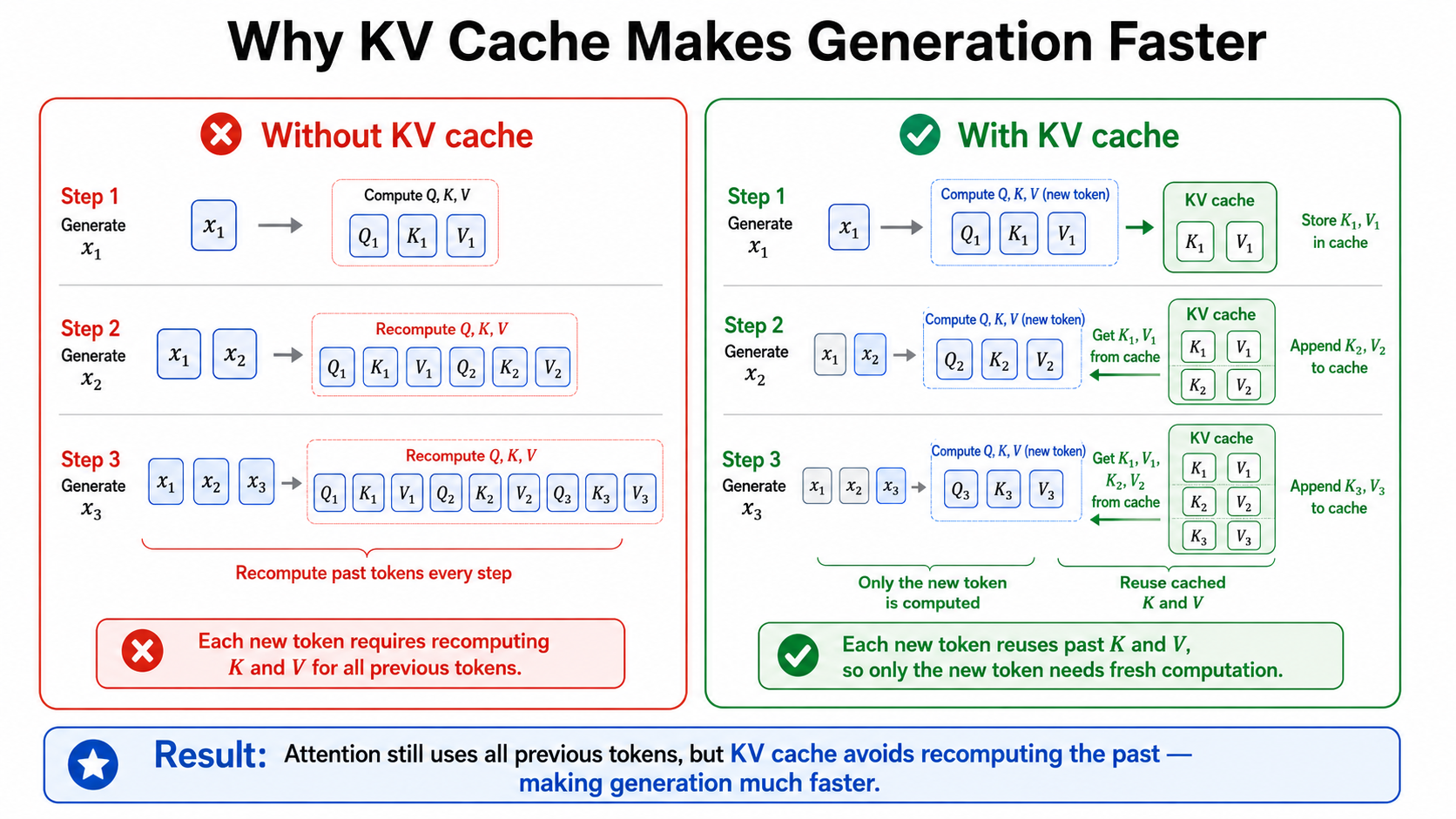
KV Cache in Practice
The KV cache is automatic and invisible; it's an implementation detail of the inference engine (vLLM, TensorRT-LLM, SGLang, etc.). You don't opt into it. Every production LLM deployment uses it.
What it does:
- During output generation: For each new token generated, the K and V for all previously generated tokens are already in cache. Only the new token needs fresh K, V computation.
- Capacity constraint: KV cache requires GPU memory, roughly proportional to batch size × sequence length × number of layers × head dimensions. At large context lengths or high concurrency, KV cache fills up and the inference engine must evict entries.
What it doesn't do:
- It doesn't persist between separate API requests. Each new API call starts with an empty KV cache for the input tokens (unless the provider implements prefix caching on top, which is the next layer).
Prompt Caching: Persisting the KV Cache Across Requests
Prompt caching (also called prefix caching or inference caching) is what happens when an LLM provider takes the KV cache idea and makes it persistent across separate API calls.
If request A and request B share the same 9,000-token system prompt, there's no reason to recompute the K and V matrices for those 9,000 tokens on request B. The provider can store the computed KV cache from request A and reuse it.
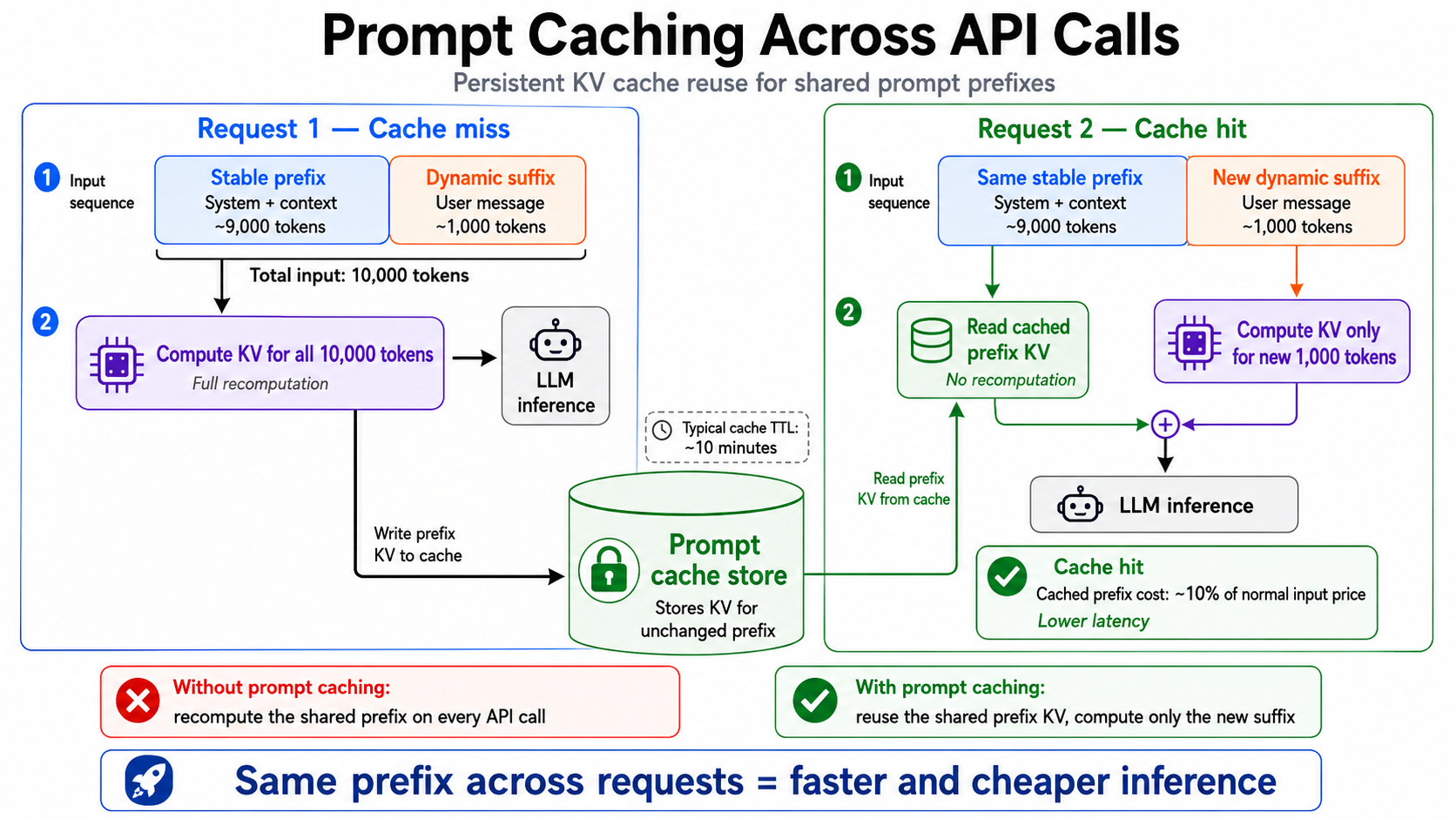
The Prefix Match Invariant
Here's the most important rule for prompt caching: caching is based on exact prefix match, byte for byte.
The provider compares the incoming prompt against cached prompts at the token level. The cache only applies to the longest matching prefix. The moment a single token differs, the cache ends there, and everything after that point must be recomputed.
This means:
[system: "You are a helpful assistant."][user: "What is 2+2?"]shares a cache with[system: "You are a helpful assistant."][user: "What is 3+3?"], so the system prompt prefix is cached and only the differing user message is recomputed.[system: "You are a helpful assistant."]and[system: "You are a helpful assistant. Reply in French."]still share the cached prefix up through"You are a helpful assistant.". Only the appended text onward is new. Editing the end of a prompt does not throw away the cache for everything before the edit. Likewise,"You are a helpful assistant (v2)."keeps the cache up to"You are a helpful assistant"and only diverges at the" (v2)"tokens.- What does cause a near-total miss is changing something at the very start.
[system: "[build 7f3a] You are a helpful assistant."]differs on its first tokens, so nothing after them matches and the whole prefix is recomputed. This is why volatile values / variables in your system prompt belong at the end of the stable region, never the front.
A byte change invalidates the cache from that point forward, but everything before the change stays cached. This is the single most important thing to internalize about prompt caching.
NOTE: In practice, providers only cache prefixes above a minimum length and round the cached region down to a fixed block boundary, so very small matches like the five tokens above aren't independently cacheable.
Provider APIs: How to Enable Prompt Caching
Anthropic (Claude)
Claude offers two modes for enabling prompt caching — automatic and explicit — both using cache_control, but placed differently.
Automatic caching (recommended for multi-turn conversations): place cache_control at the top level of the request. The API automatically moves the cache breakpoint to the last cacheable block on every request, so as your conversation history grows, old turns are read from cache and only new turns are written. You don't manage breakpoint placement yourself.
1import anthropic
2
3client = anthropic.Anthropic()
4
5response = client.messages.create(
6    model="claude-opus-4-8",
7    max_tokens=1024,
8    cache_control={"type": "ephemeral"},  # top-level = automatic mode
9    system="You are an expert software engineer...",
10    messages=[
11        {"role": "user", "content": "What is a linked list?"},
12        {"role": "assistant", "content": "A linked list is..."},
13        {"role": "user", "content": user_question},  # new turn, rest read from cache
14    ]
15)
Explicit caching (recommended for static content like RAG documents or system prompts): place cache_control on individual content blocks. The provider caches everything from the start of the prompt up through the marked block. You can place up to 4 breakpoints per request to create tiered cache boundaries.
1response = client.messages.create(
2    model="claude-opus-4-8",
3    max_tokens=1024,
4    system=[
5        {
6            "type": "text",
7            "text": "You are an expert software engineer...\n\n" + large_codebase_context,
8            "cache_control": {"type": "ephemeral"},        # 5-minute TTL (default)
9            # "cache_control": {"type": "ephemeral", "ttl": "1h"},  # 1-hour TTL
10        }
11    ],
12    messages=[
13        {"role": "user", "content": user_question}  # dynamic, not cached
14    ]
15)
16
17# Check cache status in response
18print(response.usage.cache_read_input_tokens)     # tokens served from cache
19print(response.usage.cache_creation_input_tokens) # tokens written to cache
20print(response.usage.input_tokens)                # tokens computed normally
cache_control has two jobs:
- Set the cache boundary — marks where the cached prefix ends (explicit mode) or moves automatically to the last block (automatic mode).
- Set the TTL —
{"type": "ephemeral"}= 5-minute cache;{"type": "ephemeral", "ttl": "1h"}= 1-hour cache.
Effect on pricing:
- 5-minute TTL (
{"type": "ephemeral"}): 1.25× base input price to write, 0.1× base price to read - 1-hour TTL (
{"type": "ephemeral", "ttl": "1h"}): 2× base input price to write, 0.1× base price to read
The write premium only applies on cache creation. On a cache hit you pay 10% of the normal token price. Use the 1-hour TTL when your conversation sessions routinely outlast 5 minutes; pay the higher write cost once and read cheaply for up to an hour.
Minimum cacheable prefix by model (Prefixes shorter than the minimum for that model don't cache):
- Claude Opus 4.8 / Sonnet: 1,024 tokens
- Claude Haiku 4.5: 4,096 tokens
- Claude Fable 5: 512 tokens
OpenAI
OpenAI's prompt caching is automatic — no cache_control markers needed. Any prompt of 1,024+ tokens is eligible and the cache is checked on every request. You see cache usage in the usage object:
1import openai
2
3client = openai.OpenAI()
4
5response = client.chat.completions.create(
6    model="gpt-4o",
7    messages=[
8        {"role": "system", "content": large_system_prompt},
9        {"role": "user", "content": user_question},
10    ],
11    # Optional: control cache retention policy
12    # prompt_cache_retention="in_memory",  # 5-10 min inactivity window, max 1h (default)
13    # prompt_cache_retention="24h",        # up to 24h (model-dependent)
14)
15
16# Check cache usage
17cached_tokens = response.usage.prompt_tokens_details.cached_tokens
18print(f"Cached tokens: {cached_tokens}")
19print(f"Total prompt tokens: {response.usage.prompt_tokens}")
Two retention policies are available via prompt_cache_retention:
"in_memory"(default): cache evicted after 5–10 minutes of inactivity, max 1 hour"24h": cache persists up to 24 hours (available on supported models)
You can also pass prompt_cache_key to influence request routing and improve hit rates when many requests share the same prefix across different sessions.
OpenAI's cached tokens are priced at 50% of the normal input token price.
AWS Bedrock
AWS Bedrock uses explicit cachePoint markers (Converse API) or cache_control blocks (InvokeModel API for Claude). TTL is configurable per checkpoint — omitting it defaults to 5 minutes.
1import boto3
2
3bedrock = boto3.client("bedrock-runtime", region_name="us-east-1")
4
5response = bedrock.converse(
6    modelId="anthropic.claude-opus-4-5-20251101-v1:0",
7    system=[
8        {"text": large_system_prompt},
9        {
10            "cachePoint": {
11                "type": "default",
12                # "ttl": "1h",  # optional; defaults to "5m"; 1h only on supported models
13            }
14        },
15    ],
16    messages=[
17        {"role": "user", "content": [{"text": user_question}]}
18    ]
19)
20
21usage = response["usage"]
22print(f"Cache read tokens: {usage.get('cacheReadInputTokens', 0)}")
23print(f"Cache write tokens: {usage.get('cacheWriteInputTokens', 0)}")
Note that cachePoint is a separate object in the array (not a field on the text block), unlike Claude's direct API where cache_control sits on the content block itself.
Two TTL tiers, same as the direct Claude API:
"5m"(default): 5-minute cache, 1.25× write cost"1h": 1-hour cache, 2× write cost — only available on Claude Opus 4.5, Sonnet 4.5, and Haiku 4.5
Minimum tokens per checkpoint also varies by model: 1,024 tokens for Claude Opus 4 / Sonnet 4.6 / Claude 3.x, 4,096 tokens for Claude Opus 4.5 / Sonnet 4.5 / Haiku 4.5. Up to 4 checkpoints per request.
How to Structure Prompts to Maximize Cache Hits
The rule is simple: any variable or dynamic value in your prompt should appear as late as possible. The cache is a prefix match — everything before the first change is reusable, everything after it is recomputed. So if your system prompt starts with f"Current time: {datetime.now()}", that timestamp changes every request and busts the cache for every token that follows it, including the thousands of tokens of static instructions below it.
1# BAD: dynamic value at the top poisons everything below it
2system_prompt = f"""
3Current time: {datetime.now().isoformat()}
4User tier: {user_tier}
5
6You are a helpful assistant. [... 5,000 tokens of instructions ...]
7"""
8
9# GOOD: stable instructions first, dynamic values at the end of the system prompt
10system_prompt = f"""
11You are a helpful assistant. [... 5,000 tokens of instructions ...]
12
13User tier: {user_tier}
14Current time: {datetime.now().isoformat()}
15"""
The same applies to any variable inside the system prompt: put it after all the static instructions, not before them.
Semantic Caching: Caching by Meaning
Prompt caching and KV caching are exact-match: if a single byte changes, the cache doesn't apply. Semantic caching takes a different approach: it caches LLM responses and uses embedding similarity to match new questions against previously answered ones.
The core idea: "What is the capital of France?" and "Tell me the capital city of France" mean the same thing. Instead of calling the LLM again, semantic caching returns the cached response from the first question.
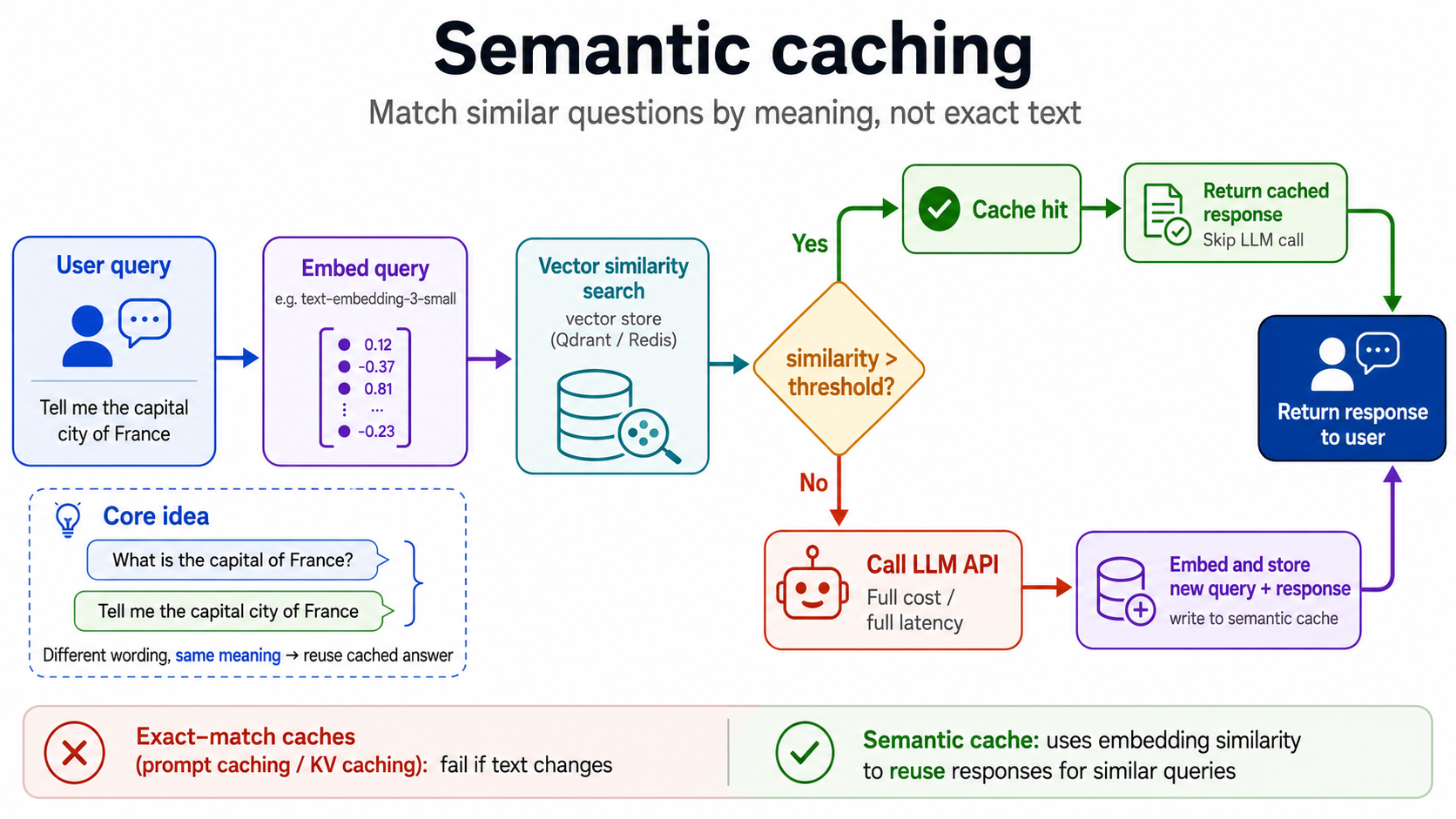
How Semantic Caching Works
- Embed the query: Convert the incoming question into an embedding vector (a dense numerical representation of meaning).
- Search the cache: Perform a nearest-neighbor search in a vector store to find the most similar previously-asked question.
- Check the threshold: If the cosine similarity between the new query and the cached query exceeds a threshold (e.g., 0.95), it's a cache hit. Return the stored response.
- On a miss: Call the LLM, then embed the query-response pair and store it in the vector cache for future hits.
Semantic Caching Tradeoffs
Semantic caching is powerful but has real tradeoffs you should understand before deploying it:
| Consideration | Impact |
|---|---|
| Non-determinism risk | You're returning a response from a previous question that's similar, not identical. If the original question was "What's the EU VAT rate?" and the new one is "What's the UK VAT rate?", a similarity score of 0.93 might incorrectly serve the EU response. |
| Threshold tuning | Too high (0.99): few cache hits, near-zero benefit. Too low (0.80): dangerous hallucination risk. 0.92–0.97 is usually a safe starting range. |
| Context sensitivity | Semantic caching works best for factual Q&A and structured tasks. It breaks down for tasks where context matters heavily (e.g., "summarize this document"). |
| Cache invalidation | When facts change (prices, policies, real-world events), stale semantic cache entries return outdated information. Implement TTLs and a way to bust the cache. |
| Extra latency on miss | A cache miss now costs: embed query + vector search + LLM call. That's slightly more latency than a plain LLM call. The bet is that high hit rates amortize this overhead. |
| Infrastructure cost | You're now operating a vector store. Not free. At very low query volumes, the infrastructure cost may exceed the LLM savings. |
Provider Comparison: OpenAI vs. Claude vs. Bedrock
Here's a side-by-side comparison of prompt caching support across major providers:
| Feature | Anthropic Claude | OpenAI | AWS Bedrock |
|---|---|---|---|
| Caching type | Explicit (cache_control) | Automatic | Explicit (cachePoint) |
| Minimum prefix | 1,024–2,048 tokens | 1,024 tokens | Varies by model |
| TTL | 5 min or 1 hour (opt-in) | ~5 min (auto) | ~5 min |
| Cache read price | 10% of base input | 50% of base input | 10% of base input |
| Cache write price | 125–200% of base input | Base input price | 125% of base input |
| Cache hit detection | cache_read_input_tokens | cached_tokens in prompt_tokens_details | cacheReadInputTokens |
| Max breakpoints | 4 per request | N/A (automatic) | 1 per request |
| Tool caching | Yes (tools count as prefix) | Yes | Partial |
| Zero-retention orgs | Supported | Supported | Supported |
Cost Comparison Example
Scenario: 10,000-token system prompt, 500-token user message, 500-token response, 10,000 requests/day.
Without caching: 10,500 input tokens × price/token × 10,000 requests
With Claude prompt caching (5-min TTL, 100% hit rate after first request):
- Cache write cost:
10,000 tokens × 1.25× price(once per 5 minutes = ~288 writes/day) - Cache read cost:
10,000 tokens × 0.1× price × 10,000 requests - Non-cached tokens:
500 tokens × price × 10,000 requests
At Claude Opus 4.8 pricing ($5/1M input tokens):
- Without caching:
10,500 × $5/1M × 10,000 = $525/day - With caching:
(288 writes × 10,000 × $6.25/1M) + (10,000 × 10,000 × $0.50/1M) + (10,000 × 500 × $5/1M)≈$18 + $50 + $25 = $93/day
Savings: ~82% reduction in input token costs.
Measuring Cache ROI in Production
Knowing your cache hit rate is critical. A cache that's not actually hitting is a false economy (you're paying the write premium for nothing).
Tracking Cache Metrics with Claude
1import anthropic
2from dataclasses import dataclass, field
3from collections import defaultdict
4
5@dataclass
6class CacheMetrics:
7    total_requests: int = 0
8    cache_hits: int = 0
9    cache_misses: int = 0
10    total_input_tokens: int = 0
11    cache_read_tokens: int = 0
12    cache_write_tokens: int = 0
13
14    @property
15    def hit_rate(self) -> float:
16        if self.total_requests == 0:
17            return 0.0
18        return self.cache_hits / self.total_requests
19
20    @property
21    def estimated_savings_usd(self) -> float:
22        # Claude Opus 4.8: $5/1M input, $0.50/1M cache read, $6.25/1M cache write
23        base_cost = self.total_input_tokens * 5 / 1_000_000
24        actual_cost = (
25            (self.cache_read_tokens * 0.50 / 1_000_000)
26            + (self.cache_write_tokens * 6.25 / 1_000_000)
27            + ((self.total_input_tokens - self.cache_read_tokens - self.cache_write_tokens) * 5 / 1_000_000)
28        )
29        return base_cost - actual_cost
30
31metrics = CacheMetrics()
32
33def tracked_llm_call(system_prompt: str, user_message: str) -> str:
34    client = anthropic.Anthropic()
35    response = client.messages.create(
36        model="claude-opus-4-8",
37        max_tokens=1024,
38        system=[{
39            "type": "text",
40            "text": system_prompt,
41            "cache_control": {"type": "ephemeral"},
42        }],
43        messages=[{"role": "user", "content": user_message}],
44    )
45
46    usage = response.usage
47    metrics.total_requests += 1
48    metrics.total_input_tokens += usage.input_tokens
49    metrics.cache_read_tokens += usage.cache_read_input_tokens or 0
50    metrics.cache_write_tokens += usage.cache_creation_input_tokens or 0
51
52    if usage.cache_read_input_tokens and usage.cache_read_input_tokens > 0:
53        metrics.cache_hits += 1
54    else:
55        metrics.cache_misses += 1
56
57    return response.content[0].text
58
59# After some requests:
60def print_metrics():
61    print(f"Hit rate: {metrics.hit_rate:.1%}")
62    print(f"Cache read tokens: {metrics.cache_read_tokens:,}")
63    print(f"Estimated savings: ${metrics.estimated_savings_usd:.2f}")
Key Metrics to Track
| Metric | Formula | What it tells you |
|---|---|---|
| Cache hit rate | cache_hits / total_requests | Primary efficiency signal |
| Cache coverage | cache_read_tokens / total_input_tokens | What % of your tokens come from cache |
| Cost per request (cached) | (cache_read + uncached) cost / requests | Actual cost vs. baseline |
| TTFT improvement | p50 latency (hit) / p50 latency (miss) | Latency benefit from caching |
| Write amortization | cache_read_hits / cache_write_events | Are writes paying for themselves? |
When Caching Isn't Worth It
Caching has a write premium: you pay extra on the first request (cache creation). This only pays off if subsequent requests reuse that cache. Caching isn't worth it when:
- Low traffic: If you have fewer than 100 requests/day sharing the same system prompt, the write premium may exceed the savings.
- Short TTL relative to traffic pattern: If requests come in bursts with long gaps, the cache expires between bursts and every request pays the write premium.
- High prompt variability: If every request has a unique prefix (e.g., each user has a fully personalized system prompt), there's nothing stable to cache.
- Very small prompts: Below the minimum prefix length (1,024–4,096 tokens), caching doesn't apply at all.
Common Pitfalls and How to Avoid Them
1. Prefix Invalidation Cascades
Changing anything early in the prompt invalidates everything after it. If your system prompt has a version number in it:
1# BAD
2system_prompt = f"System v{VERSION}. Instructions: ..."
3
4# After a version bump, 100% cache miss until TTL expires
Keep version metadata out of the main prompt text. If you need to track which prompt version produced a response, store it in your application metadata, not in the prompt itself.
2. Tool Order Variability
Tools are processed before the system prompt in Claude's cache ordering. If the list of tools passed to each request varies (different order, different subset), the cache will miss on every request:
1# BAD: dict ordering may vary between Python versions or serialization
2tools = get_enabled_tools_for_user(user_id)  # Returns a different order each time
3
4# GOOD: normalize tool order
5tools = sorted(get_enabled_tools_for_user(user_id), key=lambda t: t["name"])
3. Confusing 1-Hour TTL Economics
The 1-hour TTL ({"type": "ephemeral", "ttl": 3600}) costs 2× base input price on write (vs. 1.25× for 5-minute). This is only worth it if requests are spaced more than 5 minutes apart but still within the hour. For high-frequency workloads (requests every few seconds), stick with the 5-minute TTL, since the cache will stay warm without the extra write cost.
4. Concurrent Request Race Conditions
If many requests arrive simultaneously before the cache is warm, all of them may generate cache misses and simultaneously write to the cache, paying the creation cost multiple times. The fix is to pre-warm the cache before opening traffic (see the pre-warming section above), or to use a short-circuit lock at the application layer for the first request.
5. Ignoring the 20-Block Lookback
For very long conversations (50+ turns), Claude's cache matching only looks back 20 content blocks. If you're appending conversation turns as individual content blocks, the stable "system context" blocks that come before the 20-block window won't cache as expected. Keep your system prompt in the system parameter (not in the messages array) to ensure it's always in scope for caching.
Cache-Aware Model Routing: Why "Use the Smaller Model" Is Often Wrong
Most cost-optimization advice for multi-model setups boils down to: "route easy tasks to a cheaper, smaller model." That's usually right, but it ignores caching, and once you account for the prompt cache, the naive version of that rule can actually increase your bill.
Suppose you have a long, stable context (a big system prompt, a codebase, or a RAG payload) already cached on a large model. A new task arrives that a smaller model could handle. The naive router sends it to the small model to "save money." But routing to a different model means:
- The small model has a cold cache for that context, so you pay full price to process the entire prefix again (no cache read discount).
- On the large model, that same prefix would have been served at ~10% of input price as a cache read.
When the cached context is large, a cache read on the expensive model is frequently cheaper than a full-price prefill on the cheap model. Ten percent of a big number beats one hundred percent of a slightly smaller number. So the "cheaper model" ends up costing more.
This is exactly the calculation AIAgentCostSaver makes automatically. It does cache-aware routing: it doesn't just look at whether a task is simple enough for a smaller model, it also looks at where the context is currently cached and how large it is. If the context is already warm on a larger model and big enough that the cache-read savings dominate, it keeps the request on the larger model, because that's cheaper overall even though a smaller model could technically do the job.
It only switches down to a smaller model when the math actually favors it (and the task is suitable), which happens in cases like:
- New conversation: there's no warm cache to preserve, so no cache-read advantage is lost by starting fresh on a smaller model.
- Warm large-model cache, but a very small conversation: the cached prefix is tiny, so the cache-read savings are negligible and the smaller model's lower per-token price wins.
- Cache has expired: provider-side KV cache is short-lived (the default TTL is only about 5–10 minutes), so once it lapses there's nothing to preserve, and the next request pays a full prefill regardless of model.
TL;DR: Key Takeaways
KV cache is automatic and built into transformer inference. It speeds up token generation by reusing computed attention matrices for tokens already processed in the same request.
Prompt caching / prefix caching is opt-in at the API level. It persists the KV cache across separate API requests by caching the computed prefix. The savings kick in when many requests share the same large prefix (system prompt, tool definitions, RAG context).
Semantic caching is your own infrastructure layer. It returns cached LLM responses for semantically similar queries using embeddings + vector search. Best for FAQ-style workloads with high query repetition.
To maximize cache hit rate:
- Put stable content first: tools → system → few-shot examples → conversation history
- Put dynamic content last: user message, timestamps, per-request variables
- Use
cache_controlmarkers explicitly (Claude) or trust auto-detection (OpenAI) - Avoid silent invalidators:
datetime.now(), non-deterministic JSON, varying tool sets - Normalize everything that's supposed to be stable
To measure ROI:
- Track
cache_read_input_tokensvs.input_tokensto get your hit rate - Calculate actual cost vs. uncached baseline using provider pricing
- Monitor TTFT (time to first token) split by cache hit/miss to measure latency wins
- Alert if hit rate drops below your expected baseline (often a sign of a silent invalidator)
LLM caching isn't free: there's a write premium, infrastructure overhead for semantic caching, and engineering effort to structure prompts correctly. But for any production system making frequent calls with large, stable prompts, the ROI is typically 5–10× in cost reduction and meaningful latency improvement. It's one of the highest-leverage optimizations available to developers building on top of LLMs today.
Frequently Asked Questions
How does LLM caching work?
LLM caching reuses computation or results from earlier requests instead of redoing them. It happens at three layers: the KV cache stores per-token attention keys and values inside the model so generation doesn't recompute the past; prompt (prefix) caching persists that KV cache on the provider's servers so a repeated prompt prefix is skipped across separate API calls; and semantic caching stores full LLM responses in your own vector store and returns them for queries that are semantically similar. The first two save prefill compute and input-token cost; the third can skip the LLM call entirely.
What is the difference between KV cache and prompt caching?
The KV cache lives in GPU memory during a single request and is automatic, you never configure it. Prompt caching (prefix caching) is the provider persisting that KV state between separate API requests so a shared prefix (system prompt, tools, RAG context) isn't recomputed each time. Put simply: KV cache makes one request fast; prompt caching makes repeated requests cheap.
What is prefix caching in LLMs?
Prefix caching is prompt caching by another name. The provider matches the longest common prefix of your prompt against what it has already processed, reuses the cached keys and values for that prefix, and only computes tokens after the first point of difference. It's why stable content belongs at the front of the prompt and volatile content at the end.
What is semantic caching, and when should I use it?
Semantic caching embeds each incoming query, searches a vector store for a previously answered query above a similarity threshold, and returns the stored response on a hit, skipping the LLM. Use it for high-repetition, factual, FAQ-style workloads. Avoid it (or set a very high threshold) when small wording differences change the correct answer, or when responses depend heavily on live, per-request context.
How long does a prompt cache last?
Provider-side caches are short-lived. The default TTL is roughly 5 to 10 minutes of inactivity, refreshed each time the prefix is reused. Anthropic also offers an opt-in 1-hour TTL at a higher write price. Because the window is short, caching pays off most when the same prefix is hit frequently.
Does prompt caching change the model's output?
No. Prompt caching reuses the exact keys and values the model would have computed anyway, so a cache hit produces the same result as a cache miss. It only affects cost and latency, not the tokens the model sees or the distribution it samples from. (Semantic caching is different: it returns a previous response for a similar query, so it can change what the user gets.)
Why isn't my prompt cache being hit?
Almost always a "silent invalidator" near the front of the prompt: a datetime.now() timestamp, a per-request UUID, non-deterministic JSON key ordering, or a tool list whose order changes between requests. Any byte change invalidates the cache from that point forward, so a moving value at the top defeats everything after it. Sort JSON keys, pin tool order, and keep volatile data at the end. Confirm hits by reading cache_read_input_tokens (Claude) or cached_tokens (OpenAI) in the response usage.
Do I need to change my code to use prompt caching?
It depends on the provider. OpenAI caches automatically for prompts above its minimum length, so no code changes are required. Anthropic and AWS Bedrock are opt-in: you mark the end of the cacheable prefix with a cache_control (or cachePoint) breakpoint. In all cases the bigger lever is prompt structure, keeping the stable prefix identical across requests.
Is LLM caching worth it for a low-traffic app?
Not always. Caching carries a write premium on the first request, and provider caches expire in minutes. If requests sharing a prefix arrive rarely (or in bursts with long gaps), the cache expires between hits and you keep paying to re-warm it. Caching shines when a large, stable prefix is reused frequently within the TTL window. For semantic caching, you also take on vector-store infrastructure, which needs enough query volume to pay for itself.
Cut your AI bill
If this was useful, try AIAgentCostSaver.
Intelligent routing and caching that decides between Claude models. Setup in 30 seconds.